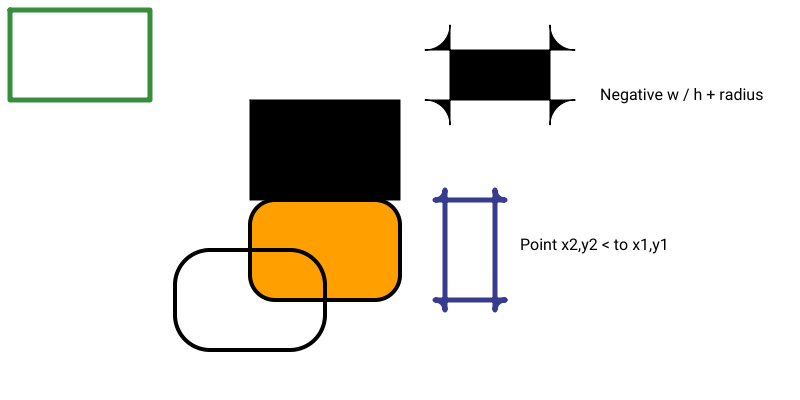
rectangle
Draw a rectangle
rectangle(
    x,
    y,
    w,
    h,
    [radius=0],
    [center],
    [stroke=#000000],
    [fill=#FFFFFF],
    [weight=1.00]
)
Draw a rectangle
Syntaxe
rectangle(x=10, y=10, w=15, h=15, stroke="#000000", fill="#FFA000", weight=4)
Arguments
| Name | Type | Required | Default | Description |
|---|---|---|---|---|
x | yes | - | x-coordinate | |
y | yes | - | y-coordinate | |
w | yes | - | Width | |
h | yes | - | Height | |
radius | - | 0 | Corner radius | |
center | - | - | if true, x/y are the center of rectangle | |
stroke | - | #000000 | Stroke color | |
fill | - | #FFFFFF | Fill color | |
weight | - | 1.00 | Stroke weight (thickness) |
Full example
canvas(width=800, height=800);

// rectangle(x=250, y=100, w=150, h=100);
// rectangle(x=250, y=200, w=150, h=100, radius=25, stroke="#000000", fill="#FFA000", weight=4);
// rectangle(x=250, y=300, w=150, h=100, radius=35, center=true, stroke="#000000", fill="transparent", weight=4);

// text("Negative w / h + radius", 600,100);
// rectangle(x=550, y=100, w=-100, h=-50, radius=25, stroke="#FF0000"); // negative dimension

font_default(20);

var columns = 7;
var gap = 13;
var sizeW = 100;
var sizeH = 70;

for (var i = 0; i < 21; i++) {
    var col = i % columns;
    var row = floor(i / columns);
    var x = (col*sizeW + col*gap + gap) + sizeW/2;
    var y = (row*sizeH + row*gap + gap) +sizeH/2;
    // println(i, col, row, x, y);
    rectangle(x, y, w=sizeW, h=sizeH, center=true, radius=i*5, stroke="#000", fill="#FFC107");
    text("r:"+i*5, x,y, ax=middle, ay=middle);
}


coord_translate(0,-70);

text("radius, and width < x, height < y", 20,400, ax=start, ay=middle);

for (var i = 35; i < 70; i++) {
    var col = i % columns;
    var row = floor(i / columns);
    var x = (col*sizeW + col*gap + gap) + sizeW/2;
    var y = (row*sizeH + row*gap + gap) +sizeH/2;
    rectangle(
        x, y, w=sizeW-i*2, h=sizeH-i*2,
        center=true,
        radius=15,
        stroke="#000", fill="#FFC107");
}

save(whoami(png=true));