spiral
Draw a spiral
spiral(
    x,
    y,
    [rmin=0],
    [rmax=100],
    [startangle=0],
    [sides=100],
    [space=1],
    [clockwise=true],
    [draw=true],
    [stroke=#000000],
    [fill=#FFFFFF],
    [weight=1.00]
)
Draw a spiral
Syntaxe
spiral(x=10, y=10, radius=5, stroke="#000000", fill="#FFA000", weight=4)
Arguments
| Name | Type | Required | Default | Description |
|---|---|---|---|---|
x | yes | - | x-coordinate of the center | |
y | yes | - | y-coordinate of the center | |
rmin | - | 0 | minimum radius | |
rmax | - | 100 | minimum radius | |
startangle | - | 0 | startAngle | |
sides | - | 100 | Number of sides (>2) | |
space | - | 1 | Space between each turn | |
clockwise | - | true | Clockwise if true, anti- if false | |
draw | - | true | If false, return a list of points, and don't draw (stroke, fill & weight are ignored) | |
stroke | - | #000000 | Stroke color | |
fill | - | #FFFFFF | Fill color | |
weight | - | 1.00 | Stroke weight (thickness) |
Full example
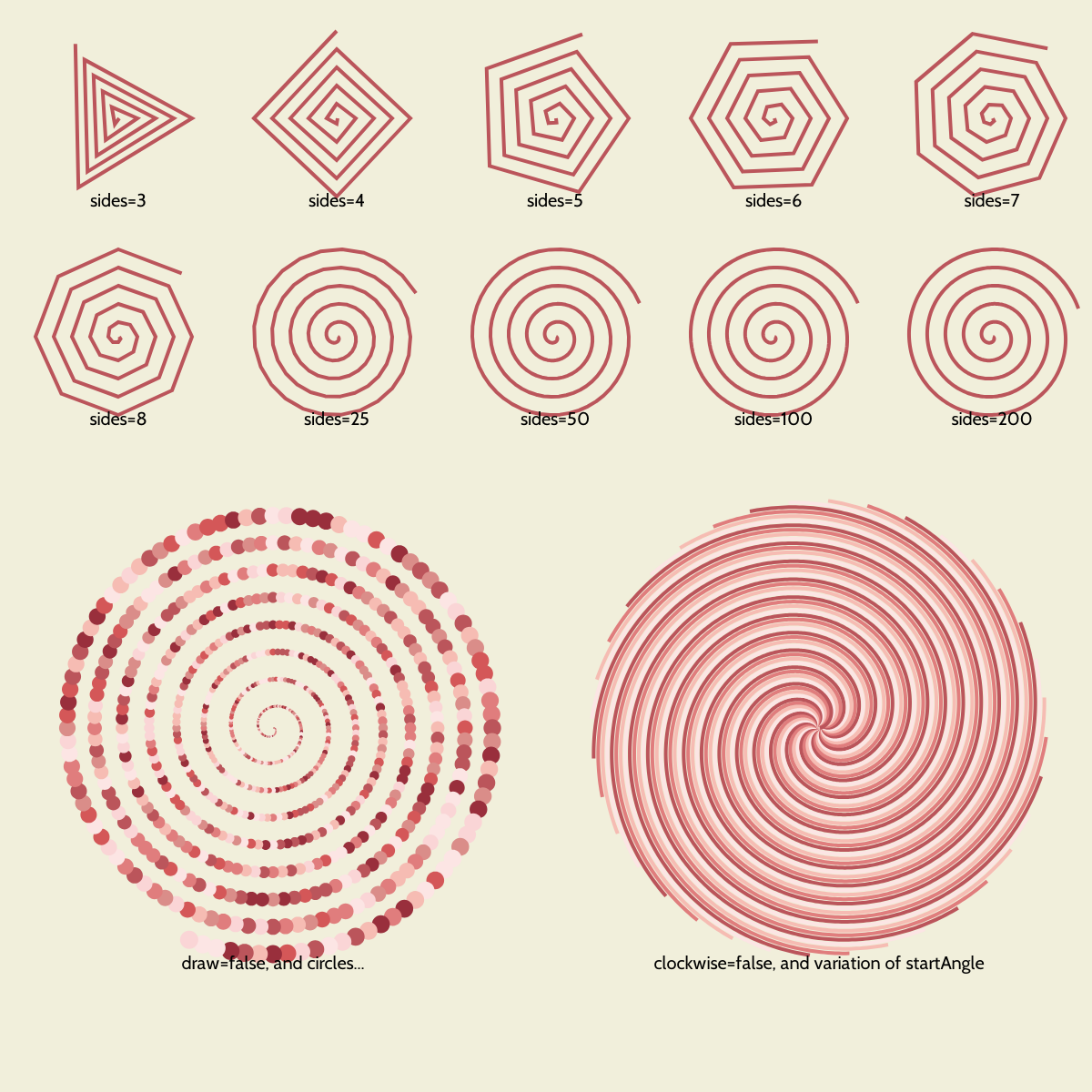
var radius = 120;
var startX = 10 + radius;
var startY = 10 + radius;

var palette = ["#FCE5E4", "#FAD5D6", "#F6BCB3", "#DA8D89", "#E07D7D", "#D45758", "#BB555B", "#992F3C"];

canvas(1200,1200, "#F1EFDB");
font_default(20);

var nCols = 5;
var sides = [3, 4, 5, 6, 7, 8, 25, 50, 100, 200];
var nRows = ceil(sides.length / nCols);
var s = 0;
for (var yIndex = 0; yIndex < nRows; yIndex++) {
    for (var xIndex = 0; xIndex < nCols; xIndex++) {
        if (s >= sides.length) { break; }
        var x = startX + xIndex * radius * 2;
        var y = startY + yIndex * radius * 2;
        spiral(x=x, y=y, sides=sides[s], rmin=1, space=20, rmax=100, weight=4, fill="", stroke="#BB555B");
        text("sides="+sides[s], x, y + 102, ax=middle, ay=end);
        s += 1;
    }
}

coord_open();
coord_translate(width()/4, 800);
var result = spiral(x=0, y=0, space=30, rmin=1,rmax=250.5, draw=false);
for(var i=0; i<result.length-1; i+=2) {
    var xx = result[i];
    var yy = result[i+1];
    var d = distance(xx,yy,0,0);
    var r = map(d, 10,250, 1, 10);
    circle(xx,yy,r,fill=randlist(palette),stroke="");
}
text("draw=false, and circles...", 0, 270, ax=middle, ay=end);
coord_close();


coord_open();
coord_translate(width()/4*3, 800);


for (var i = 0; i < 360; i+=10) {
    // stroke(randlist(palette));
    weight(4);
    spiral(
        0, 0, rmin=1, rmax=250, sides=400, space=180, startangle=radians(i),
        clockwise=false,
        fill="", stroke=palette[i%palette.length]
    );
}

text("clockwise=false, and variation of startAngle", 0, 270, ax=middle, ay=end);
coord_close();


save(whoami() + ".png");